
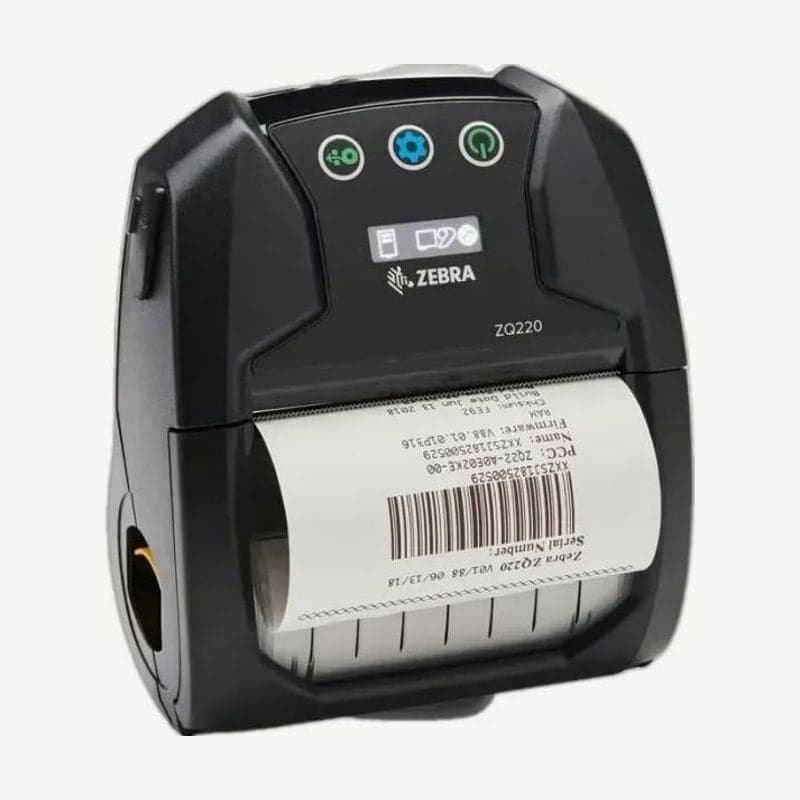
Media width changed with spacers
Out of the box, the ZQ220 fits 80 mm wide media. To use 58 mm receipt paper, first fit the spacers (KIT-MPV-MD3SPR1-5) into the media bay; the same spacers also fit 76.2 mm and 50.8 mm media. The maximum print width is 72 mm.
It accepts continuous receipts, black mark receipts, tags, and gap labels, and linerless labels are used on the optional configuration. Speed is 2.5 inches per second, and it accepts only CPCL commands.
End of sale by region
| Region | Last sale | Zebra end of support |
|---|---|---|
| Asia-Pacific (excluding China and India) | 2022-10-25 | 2025-11-30 |
| India | 2023-01-31 | 2026-02-28 |
The successor is the ZQ220 Plus. Drivers for existing ZQ220 units are on the ZQ220 driver download page.
OLED display and 3 buttons
The control panel has 3 buttons (power, settings, and media feed) and a monochrome OLED display. Press the power button and it turns on in about 1 second; to turn it off, hold it for 5 seconds.
Enter the settings screen with the settings button to step through and change print darkness, feed at power-on, feed when the cover closes, configuration report printing, and MAC address display. The media feed button handles selecting and changing items.
USB-C charging and output per charge
The battery is a 2,550 mAh (7.26 V) lithium-ion charged through the USB Type-C port. At around 23°C it takes 3.5 hours to fully charge, and one charge prints more than 500 labels 6 inches long at 13% print density.
In vehicles, plug the USB Type-C cable included with the printer into a cigarette lighter USB adapter to charge. Without an adapter, a phone USB charger also works. To rotate batteries separately, use the 3-bay battery charger.



